

Outbuild is online scheduling software to work together on connected project schedules and look-aheads, enabling everyone to move faster.
Key Takeaways

- Schedules, Lookaheads, and Weekly Work Plans within one integrated platform.
- Real-time insights and project analytics through automated dashboards.
- Easier, streamlined plan management through a user-friendly interface.
Table of contents
- Pros and Cons of Planner 3 for Construction
- What Outbuild Does That Planner Can’t
- The AI Layer That Lets You Move Even Faster
- How Much Will It Cost?
- Connected to the Tools You Already Run
- Is Making the Move Away from Microsoft Really That Painful?
For years, Microsoft Project has been one of the most accepted tools for managing construction schedules. While it had a few gaps in how it served construction teams, it could accommodate the essentials. And, it’s often been viewed as the safest option because it’s been around for so long.
Now, the “safe” choice is going away. Microsoft is discontinuing Project Online on September 30, 2026, leaving construction companies to choose between Planner 3 and Project Desktop, the installed version of Project.
With Microsoft discontinuing their options that were applicable to construction, it’s really not a question of if to leave, it’s when. Let's break down what using Microsoft Planner for construction looks like in practice.
If you're leaving Project and want to stay inside the Microsoft ecosystem, Planner 3 is your only cloud-based option. And to be fair, it’s a capable tool. It has some of the functionality construction teams need like CPM scheduling, and, given it lives in the Microsoft 365 apps teams already use, it’s hard not to give it some serious consideration.
The real question isn't whether Planner 3 is good software. It's whether it's an effective scheduling software for construction. Let’s break down the pros and cons of Planner 3 for construction teams.
Overall, Planner 3 feels like MS Project. The catch comes when you try to move your data over: Planner doesn't offer a native import for your .mpp files, so getting everything out of Project and into Planner is a real chore. (In Outbuild, we made that part painless, but more on that later.)
The bigger drawback is the same one Project has: Planner wasn't built for construction. You can make it work, but it fights you the whole way. And what makes or breaks a schedule usually isn't one big failure, it's death by a thousand cuts. Software built for construction closes each of those small gaps, so the whole job runs faster and with fewer surprises.
Outbuild is designed to close the biggest gap in construction: the disconnect between the field and the office.
The schedule is always going to change. Weather, supply chain delays, a new requirement from the owner. It's unrealistic to expect the master schedule to never change; we’re dealing with humans and Mother Nature after all. The real problem is what happens next. The field builds its lookaheads separately from the Master Schedule. So, when things inevitably change in the field, the schedule doesn’t get updated until after the fact. Over time, as more changes happen, the gap gets wider, the delays get longer, and teams lose more and more of their margin to delays that could have been avoided.
You can see it in how the old tools work. The way most teams share a lookahead is by printing or emailing a PDF. The problem is, that PDF is outdated the moment anything changes. Every update means printing and resending to everyone, which can take hours or even days. By then, the field has already moved on.
To manage a schedule proactively instead of reactively, everyone has to work off of the same real-time information.
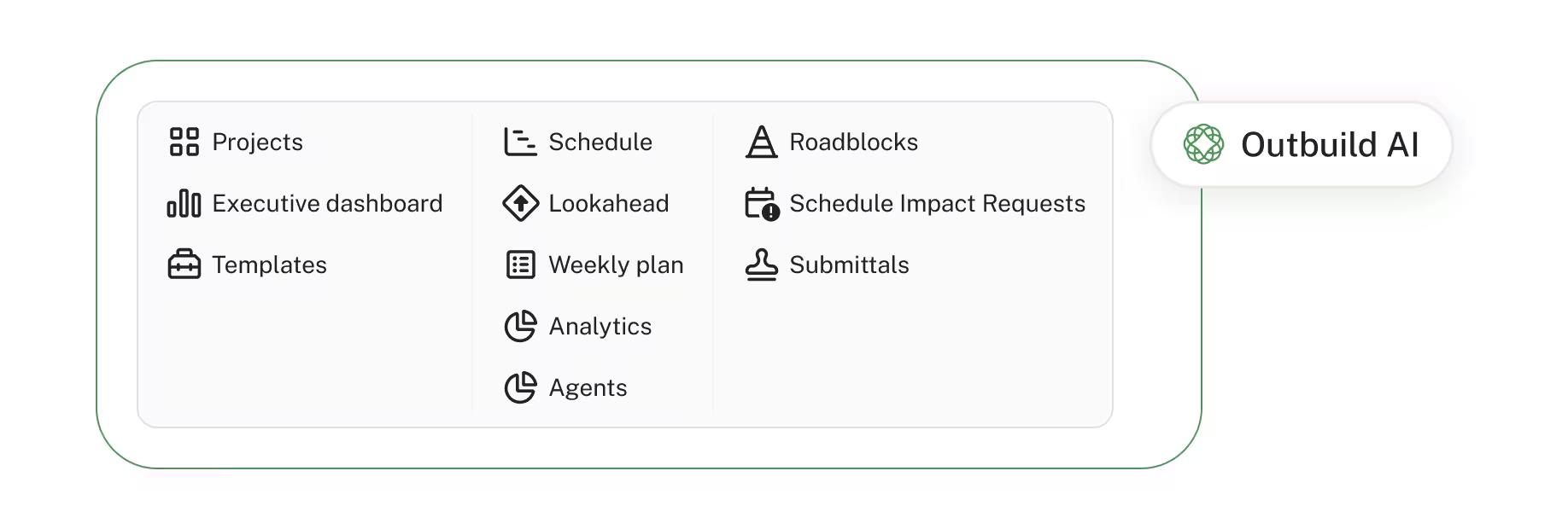
Outbuild does that four big ways:
- It ties the Lookahead directly to the Master Schedule
- It gives constraints one central home (we call them Roadblocks) and an audit-ready workflow for processing impacts to the schedule (SIRs).
- It puts a mobile and iPad app in the field so communication between the field and office happens instantly.
- It bubbles all that data up into a dashboard where leadership can easily see their schedule health and risk exposure, without navigating an additional tool.
Layered on top of those foundational elements is Outbuild AI. Work that used to take 30 minutes is now just a simple 30 second task. It takes care of those things that schedulers know they should do but never get around to. Now they're easy, so the schedule stays clean and the team has time to optimize the schedule instead of constantly triaging the timeline.
Plus, we allow for unlimited users so everyone can collaborate. That includes not only your PMs and supers, but your trade partners too. Everyone from executive leadership down to the boots in the dirt can collaborate on the schedule.
Check out how Outbuild measures up against Planner 3, feature by feature.
Let’s dive into the foundational elements that set Outbuild apart from generic tools.
1. Lookaheads that stay connected to the schedule
The biggest problem with running MS Project is that the Lookahead is completely disconnected from the schedule. This doesn’t change with Planner 3.
Say the field spots a potential delay. In Excel, that information is siloed. It sits there until the superintendent can get to the project manager, who then opens Microsoft Project, makes the change by hand, checks whether it works, and saves it. That's a lot of steps for a single change. And think about how much can happen in the week it takes to get all that back to the PM. If you'd known the moment it happened, you might have resequenced the schedule and absorbed the delay entirely.
In Outbuild, the field's updates reach the office immediately.
A superintendent can open the iPad app while walking the jobsite, pull up the sequence of work they built, and update a task right there. Tap it, set the completion percentage, done. And because the Master Schedule is connected to the Lookahead, building that Lookahead is simple: you filter activities straight from the Master Schedule.
In Outbuild, the Lookahead is always built within the bounds of the contract schedule, so a super can pull the right activities and sequence the work as they need, without ever drifting from the plan. Building a six-week Lookahead takes minutes, because it’s pulling activities straight from the schedule.
2. See delays coming before they cost you
Now let’s talk about how we manage the things that could cause delays on a job.
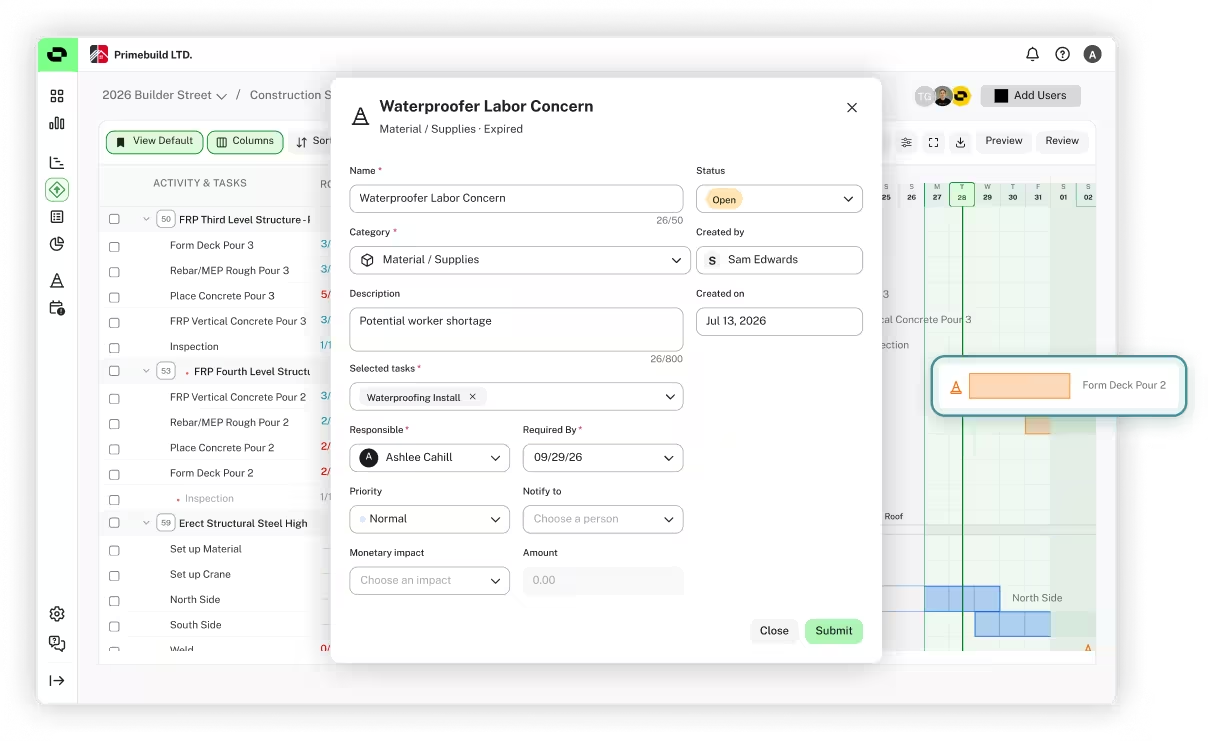
In Outbuild, every constraint or potential delay is a Roadblock, and they all live in one place: a single view of anything that could push the job. That includes RFIs, which flow in automatically from Procore and Autodesk if you're integrated.
Roadblocks are intended to be your proactive measure for identifying things that could delay the job, so you can address them before they actually cause the delay.
Here's how it works. A super logs a delay from the field, and that immediately triggers a notification to the project manager’s inbox or within Outbuild. The PM reviews it and figures out what needs to happen to remove the Roadblock and the history is tracked so leadership can see which jobs are encountering the most friction.
Now, on the other side, when you have an issue that cannot be fixed and it will cause a delay, team members log those as Schedule Impact Requests.
Imagine your schedule is sitting on baseline, with no delays. But, it rained and the team was unable to start excavation. The reviewer opens the request to modify the duration of excavation, hits preview and can see a one-day delay that pushes the entire schedule, because excavation is on the Critical Path. It’s early in the job and it’s just one day, so they approve it. Back in the Lookahead, that activity extends by a day and everything downstream shifts to match the sequencing.
Now picture doing that in the Excel and MS Planner workflow. The two aren't connected, so the moment you make a change, you're printing a new PDF and sending it to everyone all over again.
Outbuild turns eight steps into two. The field team updates the progress right in the field on the iPad, or on a computer if they'd rather, and the second there's a delay, everyone gets notified.
All of these delays are logged with a reason so if you ever need to defend the schedule, there’s an audit trail that just takes a minute to pull up.
3. Keeping the field completely connected with an iPad and mobile app
We've touched on this already, but one of the biggest ways Outbuild keeps the field and office connected is through the mobile app, on an iPad or a phone. It matters because the disconnect between the field and the office is one of the biggest failure points for a schedule. We close that gap two ways: first by tying the Lookahead to the Master Schedule, and second by making it easy to keep that connection alive from wherever the work is happening.
Here's what that looks like on the jobsite:
- A superintendent can pull up the Lookahead on an iPad while walking the site and update progress right there, tapping a task and setting its completion percentage.
- If something's in the way, the field team can add a Roadblock to the activity on the spot, and it instantly notifies the person who needs to review it.
- If a delay is going to impact the schedule, they can send a Schedule Impact Request from the field, so the reason and the impact are captured the moment it happens instead of reconstructed weeks later.
The result is a schedule that reflects what's actually happening, in real time. Everyone from leadership down to the crew is working off the same plan, and problems surface while there's still time to act on them.
This is where Planner leaves construction teams stuck. It has a mobile app, but it's built for general task management, not for a crew updating a construction schedule from the jobsite. So the field falls back to Excel, whiteboards, and phone calls, and the office hears about issues days later. That's the disconnect that breaks schedules, and it's the one we built the app to close.
4. Executive-level dashboards with live analytics
Leadership needs to know which projects are on track and which ones are about to slip, without chasing down PMs or waiting for the next status meeting. In the Microsoft world, that kind of visibility usually requires exporting data into Power BI and hiring a data analyst to build a report. Planner gives you a few basic charts, but you can't configure them, and they aren't built around how a construction project actually moves.
Outbuild's Executive Dashboard is built for exactly this. It rolls every project into one portfolio view, so leadership can see how each job is trending against its baseline, where they’re exposed, and which projects need attention today. This is what we call Scheduling Intelligence, because it gives real insight into the health of your jobs. You're looking at the metrics that matter in construction: PPC, variance, and where delays are starting to stack up.

It also gives you perspective across projects in a way a single schedule can't. For example, if you lean on the same subcontractor across several jobs, you can pull up that one sub and see everywhere they're committed over the next few weeks, then catch the overlap before two of your PMs are fighting over the same crew.
With this type of reporting, Leadership can answer "which projects are at risk, and why" in seconds, and catch conflicts and slips early, while there's still time to course correct.
We’ve talked through all the things that set Outbuild apart for construction, and now we want to cover the layer that lets you run even faster: Outbuild AI. In the video below I walk through how each of our agents helps us create and optimize a construction schedule.
Now you might say, “Microsoft is adding AI to Planner too!” But their AI sits on a general work-management tool, so it helps with general work management. Outbuild's AI sits on a platform built for construction, so it reads your critical path, checks your logic, and sequences trades. It even shows its work, so you can trust the result instead of taking it on faith.
It won't replace a scheduler's judgment. It just takes the tedious upkeep off their plate, the work everyone knows they should do but never get to. Today that includes:
- Schedule Assistant - Answers detailed questions about your schedule in seconds.
- Schedule Health Agent - Runs a full quality check and recommends fixes.
- Co-Builder Agent - Makes changes you describe in plain language, with your sign-off.
- Schedule Generator Agent (Beta) - Drafts a starting schedule from your project details.
Don’t take our word for it, just look at what Greg Cashen, VP of Operations at Catamount Constructors, said when he tried the tools.
“Scheduling has always been one of the hardest parts of running a construction project. What sets Outbuild's AI agents apart is that they actually seem to understand construction - the phasing, trade sequencing, and logic behind the schedule. It isn't just a generic AI bolted onto scheduling software. It reasons the way a scheduler does.
The Schedule Health Agent alone justifies the tool. I ran it against several schedules and it flagged issues in seconds that would have slipped past a manual review. Every check comes back pass, warning, or fail, with the specific activities called out visually, making it trivial to chase down common issues that can derail proper scheduling discipline. It's work that used to take hours, if it even got done!”
Greg Cashen, VP Operations at Catamount Constructors
With all these features, it must cost more, right? The answer is, it depends.
Microsoft prices Planner per user, so you pay for every person in the tool. For a smaller company that can be reasonable, but the more people you add, the more it costs.
That's the real problem with per-seat pricing: it makes you ration access. To keep the cost down, you leave people out, usually the field and the subs, and those are the exact people whose updates keep a schedule accurate. So you end up paying for a scheduling tool and then limiting the collaboration that makes it worth having.
The real price difference isn't the platform itself, which is comparable. It's how much a better tool saves you once everyone can actually use it.
Say you have 10 active projects. Between general conditions and liquidated damages, a day of delay runs roughly $2,000 per project. Save a single day on each of those projects, and that's $20,000 back, all because you had a better system in place that supports your team in reducing delays. Then think about a full year, on every job, with the whole team working from the same accurate schedule. How much would you save?
That's why every Outbuild plan includes unlimited users. You bring your whole team and your trade partners into the platform without worrying about a seat count. Everyone from leadership to the crew works off the same plan, and that's what keeps the schedule accurate. You never have to choose between cost and collaboration.
If you’re comparing the base cost of the platform, here’s how it breaks down: A 34-person team on Planner 3 runs at $1,020/mo., or $12,240/yr., and that's before you add a single trade partner, the Office 365 subscription or the Copilot subscription.
That brings us to integrations. We've talked a lot about how much siloes can hamstring your schedule, and the same logic applies to the tools around it: the more your schedule connects to the rest of your stack, the more smoothly everything runs. So we built integrations with the two most-used construction management platforms out there, Autodesk and Procore.
Connect either one to Outbuild, and here's what you get:
- RFIs automatically create draft Roadblocks in Outbuild, so you can get ahead of delays before they hit the schedule.
- Overdue and at-risk submittals get flagged automatically.
- Projects and directory users import straight into Outbuild, so both platforms stay in sync.
The payoff is a scheduling process that's faster and more accurate, because it's working from the same information as the rest of your project.
"It has been accepted and is actually much easier to use, and the integration with Procore has been nice as well. I love the ability to track schedule changes and the reasons for them, providing clear documentation in the event of a change order with clients."
Dan Shefland, Chief Operating Officer & Shareholder, McCormick Construction Inc
Alright so I’ve convinced you that it’s at least worth thinking about moving away from Microsoft. But how painful will it be?
The answer is…it’s not. To get started and test it out, you can just import an MS Project file (.mpp) into Outbuild. The import only takes 30 seconds and it pulls in all your activities, dates, predecessors/successors, calendars, and your current baseline.
Once it comes time to fully make the switch, we’re here to help get everyone trained up and on board. We provide training to ALL Outbuild customers, and that includes training your PMs, your supers, and leadership on how to get the most out of Outbuild in their specific role.
After the training sessions there’s unlimited live support. Just click the little bubble at the bottom right of the platform and you’ll get help from our team within a minute.
And while we offer extensive training and support, the truth is that anyone should be able to use Outbuild for their role within an hour or two of sitting down to learn it. It’s built for construction, and that means it has everything you need and nothing you don’t. No extra features to clutter up the interface or roundabout workflows that make life difficult. All in all, Outbuild feels like it’s worth learning, even for supers who have traditionally stuck to Excel.
“I have been using Outbuild for a little over a month now, and being a lifelong user of MS Project, I have noticed some major features that Outbuild offers that we only wished we had before. I'm still mastering Outbuild, but so far, so good; the support through the academy has been fantastic. I am looking forward to learning more and more, as the features are wonderful, including the ease of integration with Procore.”
Bob Chance, Site Superintendent at PENTEX BUILERS
Ready to make the switch to scheduling software built for construction teams?
If you’ve been on Microsoft Project and are being forced to move, you don’t have a ton of options. If you want to stay online, your only option is Planner 3. You could move to P6, but that comes with a whole other list of challenges and is even more restrictive when it comes to adding users and getting subs involved.
You're going to move either way. The real question is whether you move to another general-purpose tool that underserves construction, or to one built for construction from the start.
That's the case for Outbuild: a schedule and lookahead that stay connected, field updates in real time, constraints and RFIs in one place, AI that actually understands construction, and a migration that's genuinely painless. You can be up and running in a week and you’ll be adopting a tool that’s invested in enabling construction teams to run more efficient, more profitable businesses.
Want to see it in action? Schedule a demo.
Frequently Asked Questions
For online users, Microsoft is pointing everyone to Planner, with Copilot and a new "Project Manager" AI agent on top. Planner Plan 3 is the tier that includes the Gantt scheduling most Project users will recognize. Project Plan 5 and Planner 5 are no longer sold, which leaves Planner 3 as the main online option.
Planner is a capable work-management tool, and Plan 3 gives you a Gantt and a critical path, but it wasn't built for construction. There's no dedicated lookahead, no field-ready mobile app, no native Procore or Autodesk integrations, and no construction analytics. You can make it work, but you'll be working around it.
Yes. You can import an MS Project file (.mpp) into Outbuild in about 30 seconds, and it pulls in your activities, dates, predecessors and successors, calendars, and your current baseline. So you can move a real schedule over and start working right away.
Planner 3 is $30 per user per month, so the cost grows with every person you add, which makes it expensive to get the whole field and your subs into the tool.
In Planner there isn't a dedicated lookahead, so your tasks and activities all live in the master schedule, and short-term planning either bloats the master or ends up in Excel. In Outbuild, the Lookahead is a separate but connected view: the field plans the next few weeks in detail, and it flows back to the Master Schedule automatically.
Ready to see Outbuild?
Join hundreds of contractors from 10+ countries that are saving money by scheduling better



We’ll be in touch soon!