

Everything your schedulers expect from CPM.
Manage complex construction schedules with advanced CPM controls, configurable schedule structures, and P6 XER compatibility. Connect the master schedule to field planning and progress so teams work from the same plan.
Baselines and variance
Compare schedule performance against baselines and track changes to planned dates.
P6 compatibility
Import and export XER files, including exports with multiple baselines.
Multiple float paths
Identify the paths that could drive completion and understand where schedule flexibility is limited.
Data date and calculation controls
Manage schedule calculations with progress override, retained logic, and actual dates.
Schedule structure and coding
Organize activities with company and project coding hierarchies, custom Activity IDs, and configurable WBS.
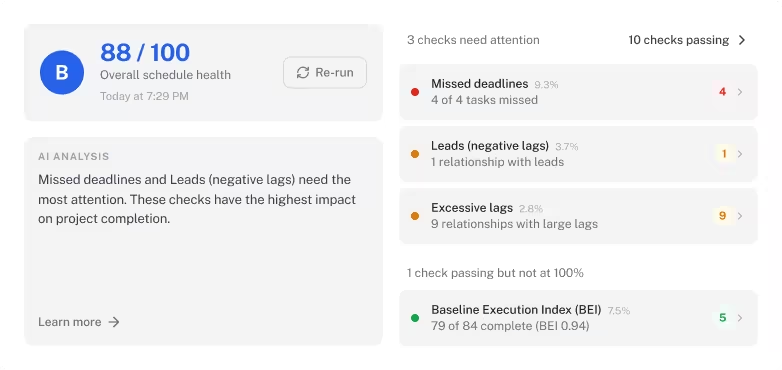
Schedule Health Agent
Configurable DCMA 14-Point AI assessment.
"It's reducing risk. It's creating consistency."
“Innovation’s been a core value for Russell for several years. When we talk about innovation, it’s about technology and improving the way we do things. So from an AI and tech perspective, we’re always looking for and open to new ideas. What drew us to Outbuild was its ability to reduce risk while also helping our team members work more efficiently.”
Caitlin Russell
President, Russell Co.
Executive Dashboard
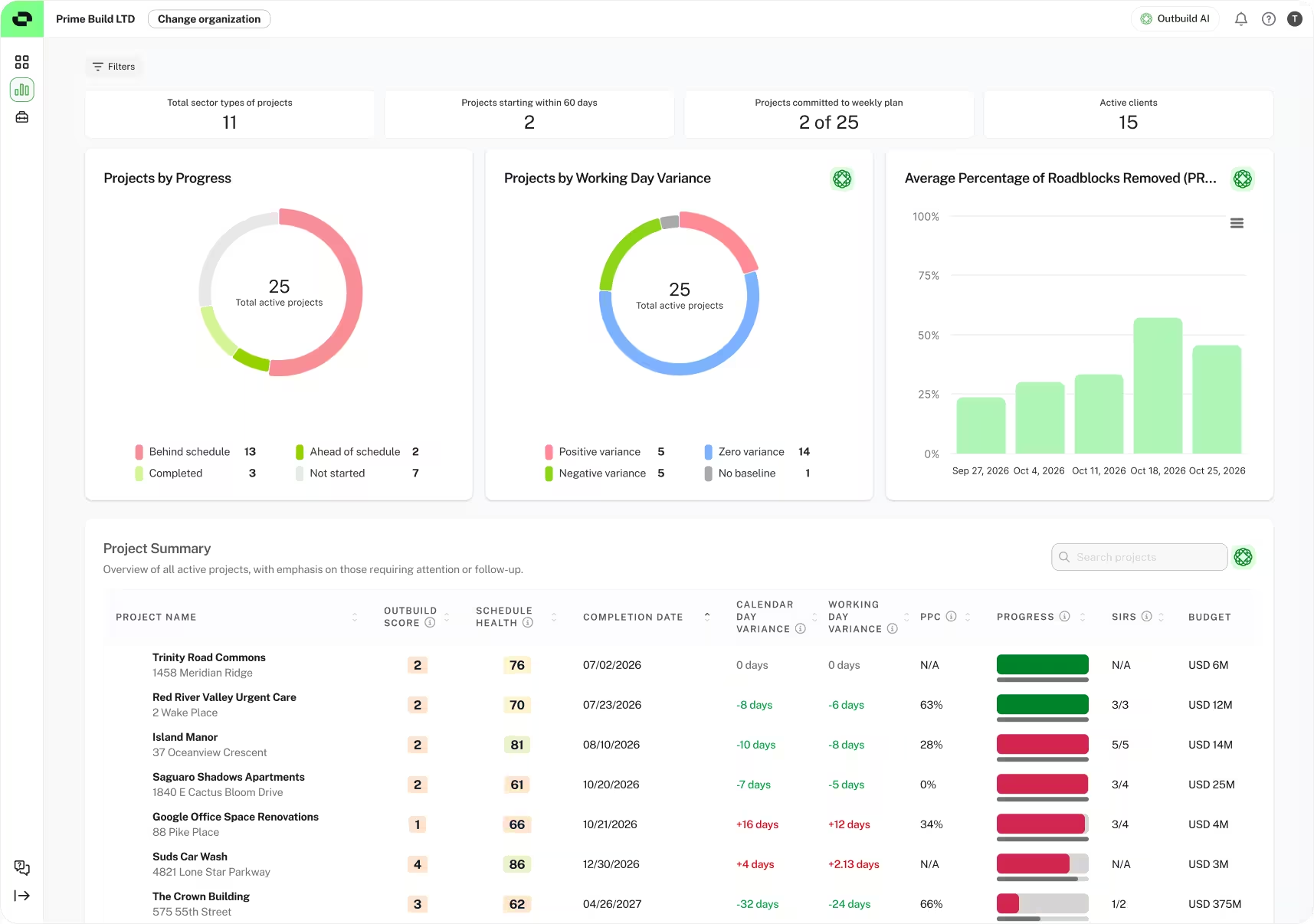
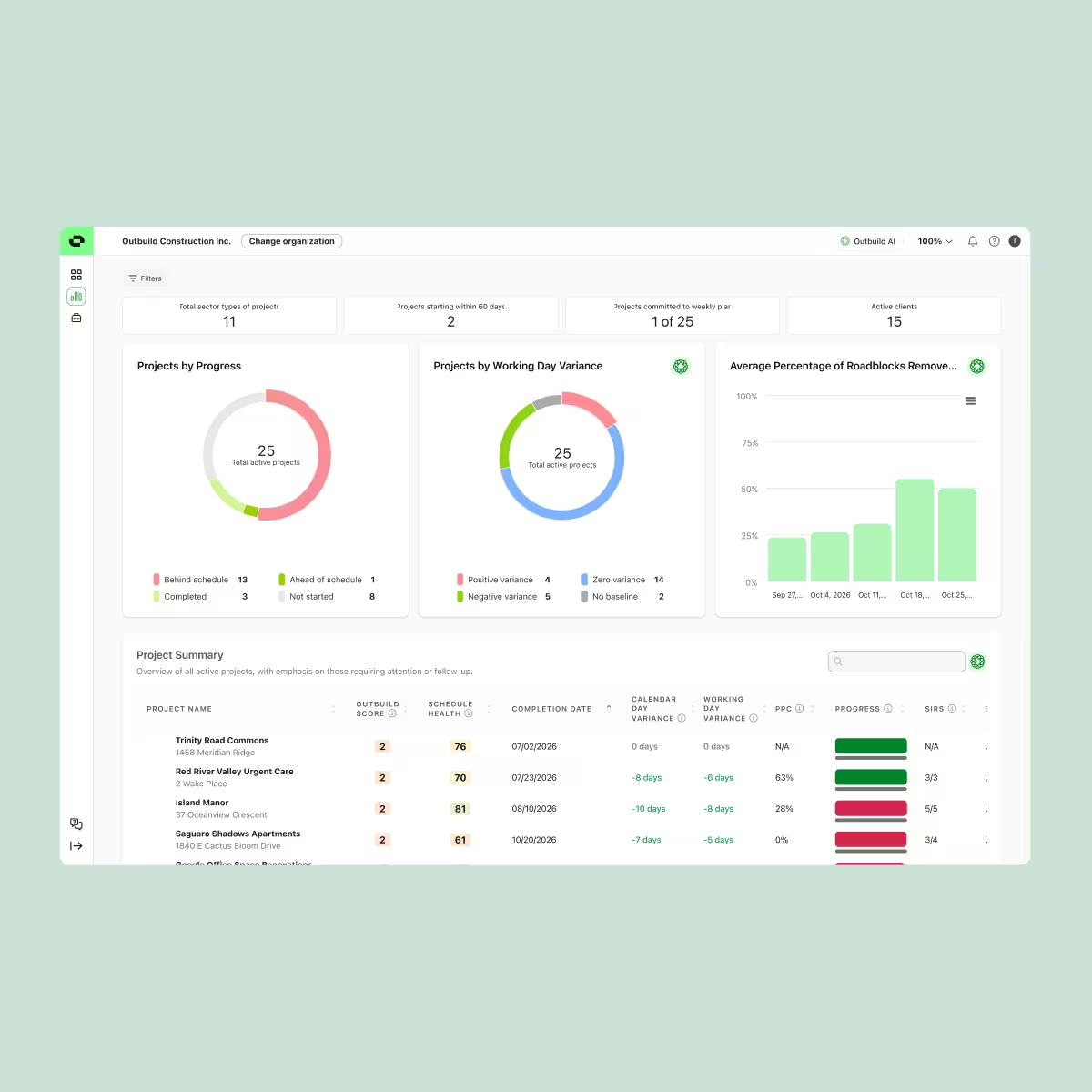
See which projects are slipping, and what’s driving it.
Compare schedule and planning performance across active projects from one dashboard.
Progress and variance: View progress, expected completion dates and working-day variance across projects.
Schedule health: Compare live Schedule Health Agent scores to identify schedules that need attention.
Field performance: See PPC, weekly commitments, variance causes, and project partner performance.
Schedule Impact Requests: Review unresolved Schedule Impact Requests (SIR) and their potential impact on critical-path work.
Standardization
Consistency across your organization.
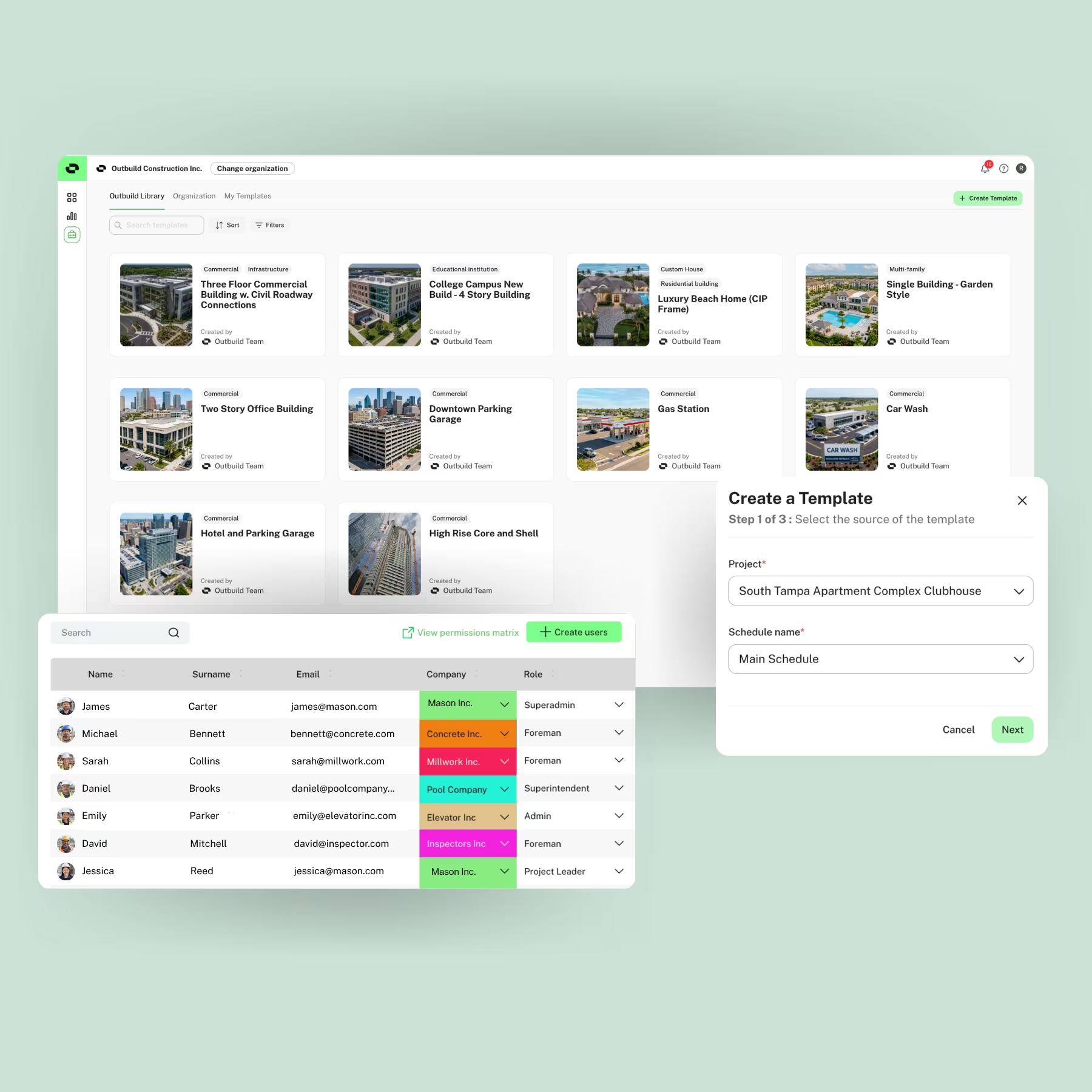
Create consistency across projects while preserving the configurability that different teams require. Use templates, project and organizational views, and permissions to define how work is structured, viewed, and managed across your organization.
- Templates: Create repeatable schedules at the project or organizational level.
- Project and Organizational Views: Define shared views so teams work with the information relevant to their roles and workflows.
- Permissions: Grant the right level of access to project leaders, PMs, schedulers, and field teams.
Know what’s putting your projects at risk.
Monitor schedule health, manage constraints, and evaluate changes with AI analysis that helps teams understand the impact on planned work.
Change Management
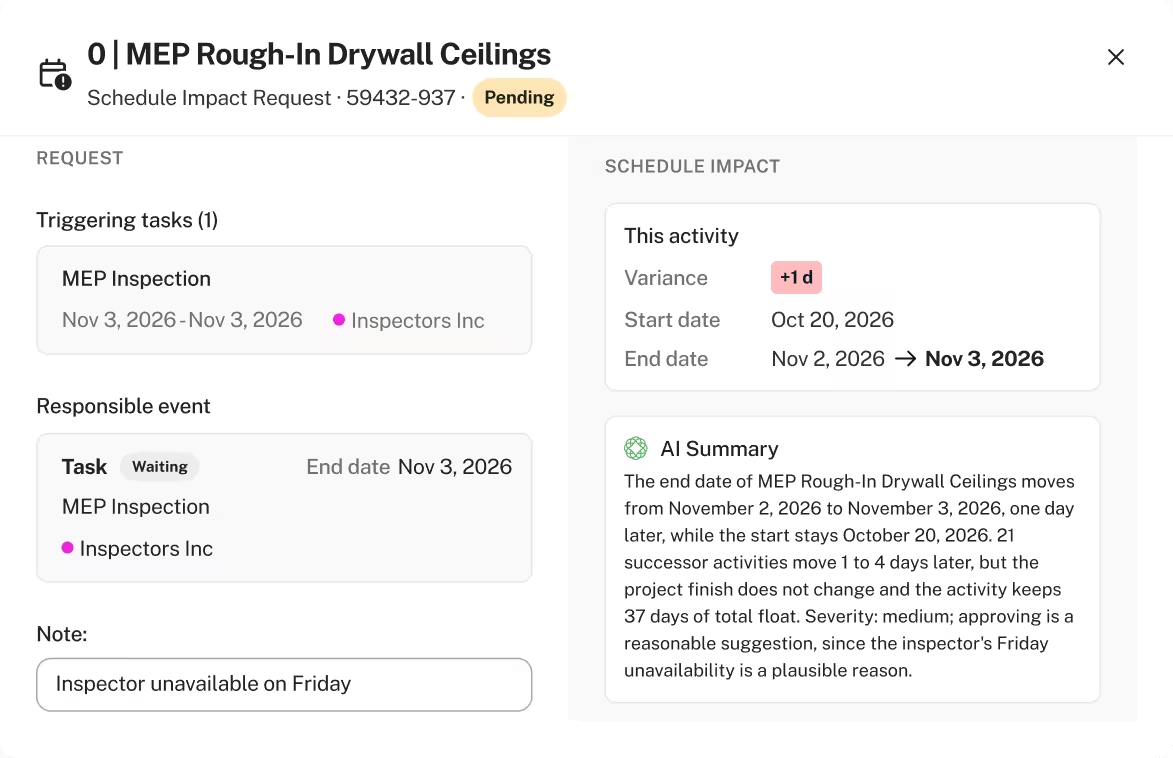
Use AI impact analysis within Schedule Impact Requests to understand how proposed changes could affect activities, sequencing, and project completion. Route requests through approvals with a clear record of decisions.
Live AI Schedule Health Checks
Run 14 DCMA checks and see Pass, Warning, or Fail results, with specific activities flagged for missing logic, unrealistic durations, negative float, and other schedule issues.
Constraint Management
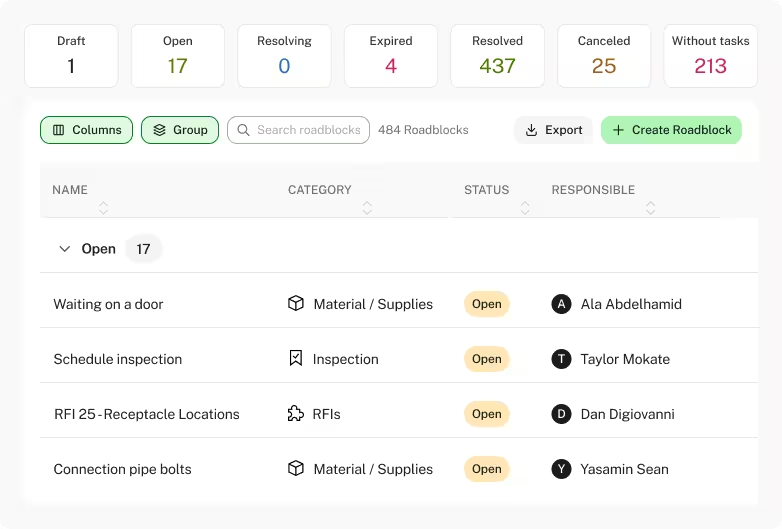
Centralize constraints across planned work, assign accountable owners, and track required resolution dates and status. Connect RFIs to Lookahead tasks so teams can review unresolved constraints during planning and prioritize what needs to be cleared.
Give enterprise teams the controls they expect around the schedule.
Support your organization’s security and procurement requirements with SOC 2 compliance, documented policies, and monitored security controls. The Outbuild Trust Center brings security, compliance, and governance information together for your team’s review.
SOC 2 compliance
SOC 2 Type I and Type II compliance.
Operational security
35 monitored controls covering areas including change management, asset inventory, configuration, and patch management.
Access and authentication
Documented policies for access control, least privilege, authentication, and credential management.
Data privacy and AI governance
Policies covering customer data protection, AI use and data handling, information security, retention, and secure disposal.
Procurement and security review
Access 25 policies and a security questionnaire through the Outbuild Trust Center.
A clear path to implementation. Support at every stage.
Build an implementation plan around your organization’s scheduling standards, project teams, and rollout priorities. Get hands-on support from initial configuration through training and ongoing adoption.
- Implementation planning: Define rollout phases, responsibilities, and success criteria with your team.
- Platform configuration: Establish organizational templates, shared views, and permissions.
- Schedule transition: Support schedule imports and help teams validate their workflows.
- Role-specific training: Equip schedulers, project leaders, field teams, and administrators for their work.
- Ongoing support: Help teams resolve questions, onboard new projects, and expand adoption across the organization.
Plug your schedule into the system your team already runs on.



Real-time two-way schedule sync
Submittals tied to schedule activities
RFIs pulled into the Roadblock Log
Drawings attached to lookahead tasks
What our customers are saying.
Scheduling directors, superintendents, and operations leaders at large GCs share how Outbuild keeps every project on the same plan.


Frequently Asked Questions
What makes Outbuild enterprise construction scheduling software?
Outbuild combines the CPM controls experienced schedulers expect (hierarchy codes, Custom IDs, baselines and P6 XER exchange) with field planning, change control and portfolio reporting in one system. Organizations standardize how schedules are built across every project, and leadership sees performance across the portfolio without manual reporting.
How should we evaluate scheduling software for large or complex projects?
Check five things: CPM depth (calculation options, codes, baselines, float analysis), compatibility with the formats owners require (P6 XER, MS Project), how field progress reaches the master schedule, how schedule changes are controlled and documented, and whether leadership can see every project without manual rollups. Then test it with a real schedule from one of your projects.
Can we standardize scheduling across regions, business units or brands?
Yes. Create schedule templates and coding structures at the company level, share organization-wide views that apply to every project automatically, and set role-based permissions for project leaders, schedulers and field teams. Each project keeps the configuration it needs within those standards.
Can Outbuild replace Primavera P6, or work alongside it?
Both. Import and export XER files with codes, calendars, constraints, tags and Activity IDs intact, and bring earlier P6 updates in as baselines. Teams can move fully to Outbuild or keep exchanging XER files with owners and reviewers who stay on P6.
How do executives see performance across all projects?
The Executive Dashboard shows progress, working-day variance and expected completion for every active project, alongside each schedule's health score and its trend. Leaders also see PPC, reasons for variance, trade partner performance and open Schedule Impact Requests. The Project Timeline shows where every job stands and which subs are committed where.
How do we move existing schedules into Outbuild?
Import P6 (XER) and MS Project (MPP or XML) files, including their calendars and coding. The implementation team helps validate imported schedules and workflows before rollout.
What does implementation look like?
Implementation follows a plan built around your scheduling standards and rollout priorities: phases and success criteria, platform configuration (templates, shared views and permissions), schedule transition, role-specific training and ongoing support. Confirm a typical timeline with CS before adding one.
Is Outbuild SOC 2 compliant?
Yes. Outbuild is SOC 2 Type I and Type II compliant. Security policies, monitored controls and a security questionnaire are available in the Outbuild Trust Center.
How is AI use governed?
Admins control which AI features are available: across the whole organization, per agent, or per user. Policies for customer data protection and AI data handling are available in the Trust Center.
Can we bring Outbuild data into Power BI or our data warehouse?
Yes. The Datahub API provides activities with baselines, historical progress for S-curves, roadblocks, reasons for variance and Schedule Impact Requests, with long-lived tokens so dashboards stay connected.
Ready to see Outbuild?
Join hundreds of contractors from 10+ countries that are saving money by scheduling better

We’ll be in touch soon!