


Outbuild is online scheduling software to work together on connected project schedules and look-aheads, enabling everyone to move faster.
Key Takeaways

- Schedules, Lookaheads, and Weekly Work Plans within one integrated platform.
- Real-time insights and project analytics through automated dashboards.
- Easier, streamlined plan management through a user-friendly interface.
Table of contents
- How to Track Construction Progress with Outbuild
- Real-Time Data: The Game-Changer in Tracking Construction
- Offline Progress, Schedule Change Log, and Executive Dashboard
- How Technology is Transforming Construction Progress Tracking
- Key Features to Look for in Construction Progress Tracking Software
- Benefits of Implementing Outbuild for Construction Progress Tracking
- Overcoming Common Challenges in Construction Progress Tracking
- Future Trends in Construction Site Tracking Technology
- Best Practices for Effective Construction Progress Tracking and Reporting
We all know how crucial it is to monitor and record the progress of construction activities on a given project. We also know that project delays and cost overruns can have major negative impacts.
So, if you’re asking how to track construction progress or how to keep track of construction projects, we have the answer. You need a solution that enables your team to make informed decisions, anticipate potential setbacks, and optimize resource allocation.
You need Outbuild, a platform built to help projects stay on track with simple, reliable construction progress tracking software.
Adopting a construction progress tracking app like Outbuild is the key to staying ahead. For example Outbuild improves scheduling efficiency and enables teams to monitor progress at every stage of a project, whether you care most about real-time progress reporting or portfolio-level metrics.
Here’s how to track construction projects with clear, repeatable steps.
Scheduling and Planning
Construction schedules change constantly as a project progresses, making scheduling a key part of any successful construction project.
Outbuild simplifies scheduling from the start. You can create a schedule in minutes with easy drag-and-drop tools. Real-time updates and permission settings also ensure a smooth user experience.
Outbuild connects the master Gantt chart schedule with look-ahead views, allowing for instant communication and adjustments. Progress from the look-ahead automatically rolls up into the master schedule. This keeps everything updated without extra work for your team.

Weekly work plans are created from the look-aheads. These plans outline the tasks the team has committed to completing that week, and tracks reasons for variance. This removes guesswork and makes sure everyone knows what to do, and helps you understand where things tend to go wrong.
For many schedulers, this is the missing link in construction project tracking.
Budgeting
Construction financial software is key. But, you should also know that Outbuild can actually help you with tracking construction costs!
Although accounting software is helpful, Outbuild can actually help you with tracking construction costs! Outbuild makes budgeting easier by linking cost tracking to project progress. Your team can enter actual costs and compare them with the budget, giving you a real-time view of your finances and helping you catch issues early.
Your Cost Earned metrics automatically update as activities are logged, keeping you on track with your job costs.
This is especially powerful on complex jobs that need software for tracking progress on long-duration construction projects or that want software for tracking progress long-duration construction projects across multiple sites.
Outbuild’s tracking construction costs columns give you simple, visual feedback so your cost and schedule conversations stay connected instead of living in separate spreadsheets.

Quality Control and Reduction of Rework
Outbuild is a tracking solution that supports optimal quality control proven to reduce rework in construction. With our platform, you’ll keep communication clear and spot issues early, so problems on the job site are a thing of the past.
Outbuild’s roadblock feature helps promote quality work by highlighting any potential issues. You can easily assign roadblocks to teammates, and the due dates with automatic reminders help get the work done fast. This proactive approach helps teams address problems before they escalate, keeping projects on track and Superintendents worry-free.

Thanks to real-time updates and handy tools like the roadblock tracker, you can tackle problems before they slow you down. Plus, Outbuild helps your team learn from past mistakes and apply those lessons to future projects, keeping those pesky errors at bay.
Another way Outbuild supports quality control is with construction manpower tracking. Having the right crew size helps avoid inefficiencies or challenges with overworked teammates. It also improves supervision, resource utilization, and safety, all of which contribute to high-quality outcomes.
This makes it easier for teams who want to know how to monitor construction site progress and how to track construction site progress without adding extra admin work.

Access to real-time data is no longer a luxury, it’s a necessity, especially for construction tracking. Outbuild's cutting-edge cloud platform gives you instant insights, helping project leaders tackle issues on the spot. Whether your team is in the office or on the field, they can quickly update and access important information. This reduces delays, ensures accountability, and keeps the project moving forward.
Outbuild’s unique integration capabilities ensure that your schedule is always up to date. With Outbuild, you can update progress from the job site using the iPad app and get alerts about roadblocks to avoid costly delays. Its approach is all about staying ahead and preventing issues, giving you the same level of clarity you’d expect from the best construction progress tracking software.
Say goodbye to the days of detailed reports living on paper or static spreadsheets. Say hello to easier document management on construction sites through a simple mobile app. Managing project progress doesn't need to be so difficult.

Every minute counts and every update matters. That’s why your tools should move as fast as your team. Construction doesn’t wait for a Wi-Fi signal and accountability shouldn’t depend on memory.
Outbuild’s Offline Progress on iPad lets your field teams keep walking the site and logging updates even when the signal drops. They can track task progress offline, and Outbuild automatically syncs updates once they’re back online.
No lost data. No double entry. Just a smoother way to handle construction progress tracking solutions on real jobs.
The Schedule Change Log gives you a clear record of every update to the schedule. You can see who changed what, when, and why, in one place.
Together, Offline Progress and the Schedule Change Log make it easier to see how things are evolving, so you don’t have to chase emails and screenshots to understand your plan.
For executives, Outbuild’s upcoming Executive Dashboard turns that same live, field-first data into a simple portfolio view.
Leaders can see schedule health, Percent Plan Complete, roadblock removal rates, and Schedule Impact Requests (SIRs) across all projects.
Instead of waiting for month-end reports, they can spot risk early, compare performance across teams and trade partners, and support the jobs that need help most.

Put simply, Outbuild ties together construction progress tracking solutions in the field, clear change history on each job, and executive-level visibility across the company.
The integration of technology into construction progress tracking is transforming the industry. Modern tools and software offer unprecedented levels of automation and efficiency, streamlining processes and enhancing collaboration across teams.
These technologies facilitate data-driven decision-making by processing large volumes of information and providing actionable insights. Having a construction tracker you can rely on ensures you and all team members can keep a pulse on progress at any time, especially if you’ve wondered how to track construction projects without adding more manual steps.
For companies juggling multiple phases and long timelines, Outbuild can serve as software for tracking progress on long-duration construction projects, helping leaders stay ahead of risk instead of reacting late.
When selecting construction progress tracking software, look for solutions that enhance productivity, streamline communication, and provide reliable support. Outbuild checks every box, delivering a comprehensive platform that centralizes project activities for better collaboration and informed decision-making.
The ability to create detailed project schedules with milestones and deadlines is essential. Additionally, the software should offer real-time progress tracking and the ability to adjust schedules as needed so teams that care about how to track construction progress can do it in one place.
Another top priority should be if the software seamlessly integrates with other project management systems. This ensures that all stakeholders have access to the latest schedule and can collaborate effectively.
Managing workflows, including submittals and Request for Information (RFI), is a critical component of construction progress tracking. The right software should offer workflows that automate these processes, reducing administrative burden and ensuring timely submissions.
For example, by connecting Procore submittals and RFIs in Outbuild, teams can track their status in real-time, making communication and collaboration among stakeholders easier. Having these tracking tools connected improves accountability and keeps projects moving forward without unnecessary delays.
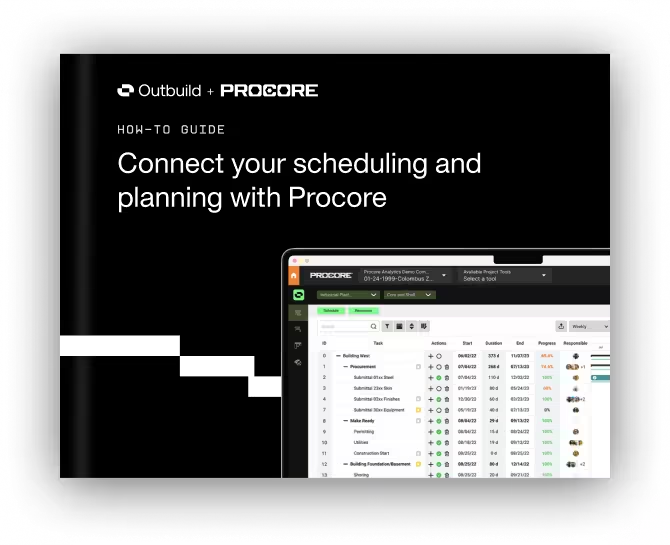
Seamless schedule syncing with Procore
Find out how connecting Outbuild’s powerful scheduling tools with Procore can empower you to:
- Syncs lookahead with the master schedule.
- Integrates with Procore in real time.
- Links RFIs and submittals to the schedule.
Outbuild offers:
- Improved project visibility: Real-time updates help teams spot issues early.
- Enhanced efficiency: Outbuild's integration capabilities streamline communication and automate processes, saving time and reducing administrative burdens.
- Cost savings: Automated cost tracking and early identification of roadblocks keep projects on budget and help reduce delays.
- Future learnings: By analyzing past projects, Outbuild helps teams improve processes for the future.
- Better resource management: how to keep track of construction workers is no longer a question with Outbuild. Clear communication and a central platform helps teams manage resources and resolve scheduling conflicts.
- Field Access: Outbuild’s cloud-based access keeps everyone updated, whether in the office or on-site.
For teams who work on bigger, complex programs, Outbuild also functions as software for tracking progress long-duration construction projects, making long-range risk easier to see and address.
Learning new technology can be challenging. Outbuild ensures that the process is smooth with live support, custom training, and the ability to import existing schedules. Outbuild simplifies the transition and helps teams see the value from day one.

"Going through implementation with the team at Outbuild has been great. They want us to not only use the software, but use it successfully. The set-up was pain free." – Mark Clayton, President at Prosser Wilbert Construction
If you’ve ever struggled with how to monitor construction site progress across multiple crews or worried about what tools are available to automate progress tracking team updates and roadblock reporting?, Outbuild is built to remove that friction.
The future of construction project management software is bright, with several emerging trends set to shape the industry. A rising trend is using predictive analytics to identify problems early and act proactively.
Another trend is the rise of AI for project management. By leveraging machine learning and artificial intelligence, construction progress tracking software can analyze historical data to identify patterns and provide insights for better project planning.
Teams are also asking more often for tools for automating progress tracking team updates roadblock reporting that plug into their existing systems, instead of yet another standalone tool.
- Define Clear Objectives: It is important to establish well-defined objectives and communicate them across all teams. This ensures that everyone is on the same page with the project goals and can work towards the same end goal.
- Implement Robust Scheduling: Utilize advanced scheduling tools to create a detailed roadmap of the project. Break the project down into manageable tasks, set realistic timelines, and identify key milestones to monitor progress effectively.
- Leverage Technology Solutions: Invest in construction progress tracking software such as Outbuild to streamline processes and ensure real-time updates.
- Integrate Budgeting: Track and monitor project costs through the software to identify any discrepancies or potential overruns. By integrating budgeting into construction tracking, teams can make data-driven decisions to keep projects on track.
- Improve: After completing a project, analyze performance metrics and identify areas for improvement. Implement these learnings into future projects to improve processes and drive better results.
By following these best practices, construction businesses can ensure efficient project tracking, reduce delays, and deliver high-quality projects, whether they work on fast-turn remodels or long-duration programs.
Outbuild isn’t just about construction progress tracking, it’s about transforming how you manage construction.

"Outbuild has been one of the best partner tools that Orion has implemented in the past 15 years. It has allowed for a collaborative environment for teams and given that the system is easy to use and learn, it makes the onboarding much more efficient."
See how Orion Builders elevated efficiency — Case Study.
Ready to empower your construction company with ultimate construction progress tracking capabilities? Book a demo or sign up for a free trial today!
Seamless schedule syncing with Procore
Outbuild offers:
- Improved project visibility: Real-time updates help teams spot issues early.
- Enhanced efficiency: Outbuild's integration capabilities streamline communication and automate processes, saving time and reducing administrative burdens.
- Cost savings: Automated cost tracking and early identification of roadblocks keep projects on budget and help reduce delays.
- Future learnings: By analyzing past projects, Outbuild helps teams improve processes for the future.
- Better resource management: how to keep track of construction workers is no longer a question with Outbuild. Clear communication and a central platform helps teams manage resources and resolve scheduling conflicts.
- Field Access: Outbuild’s cloud-based access keeps everyone updated, whether in the office or on-site.
For teams who work on bigger, complex programs, Outbuild also functions as software for tracking progress long-duration construction projects, making long-range risk easier to see and address.
Learning new technology can be challenging. Outbuild ensures that the process is smooth with live support, custom training, and the ability to import existing schedules. Outbuild simplifies the transition and helps teams see the value from day one.
"Going through implementation with the team at Outbuild has been great. They want us to not only use the software, but use it successfully. The set-up was pain free." – Mark Clayton, President at Prosser Wilbert Construction
If you’ve ever struggled with how to monitor construction site progress across multiple crews or worried about what tools are available to automate progress tracking team updates and roadblock reporting?, Outbuild is built to remove that friction.
The future of construction project management software is bright, with several emerging trends set to shape the industry. A rising trend is using predictive analytics to identify problems early and act proactively.
Another trend is the rise of AI for project management. By leveraging machine learning and artificial intelligence, construction progress tracking software can analyze historical data to identify patterns and provide insights for better project planning.
Teams are also asking more often for tools for automating progress tracking team updates roadblock reporting that plug into their existing systems, instead of yet another standalone tool.
- Define Clear Objectives: It is important to establish well-defined objectives and communicate them across all teams. This ensures that everyone is on the same page with the project goals and can work towards the same end goal.
- Implement Robust Scheduling: Utilize advanced scheduling tools to create a detailed roadmap of the project. Break the project down into manageable tasks, set realistic timelines, and identify key milestones to monitor progress effectively.
- Leverage Technology Solutions: Invest in construction progress tracking software such as Outbuild to streamline processes and ensure real-time updates.
- Integrate Budgeting: Track and monitor project costs through the software to identify any discrepancies or potential overruns. By integrating budgeting into construction tracking, teams can make data-driven decisions to keep projects on track.
- Improve: After completing a project, analyze performance metrics and identify areas for improvement. Implement these learnings into future projects to improve processes and drive better results.
By following these best practices, construction businesses can ensure efficient project tracking, reduce delays, and deliver high-quality projects, whether they work on fast-turn remodels or long-duration programs.
Outbuild isn’t just about construction progress tracking, it’s about transforming how you manage construction.
"Outbuild has been one of the best partner tools that Orion has implemented in the past 15 years. It has allowed for a collaborative environment for teams and given that the system is easy to use and learn, it makes the onboarding much more efficient."
See how Orion Builders elevated efficiency — Case Study.
Ready to empower your construction company with ultimate construction progress tracking capabilities? Book a demo or sign up for a free trial today!
Frequently Asked Questions
Outbuild gives you a single system that ties together schedules, look-aheads, weekly work plans, and field updates. Instead of juggling multiple tools, you get real-time visibility into commitments, roadblocks, and production directly from the field.
If you need live job site information, Outbuild is construction project tracking software that connects field progress from the iPad app straight into the master schedule. Superintendents can update tasks as they walk the site, and office teams see those changes in seconds.
For remodels and repeat work, Outbuild combines schedule data, cost earned metrics, and roadblock tracking so you can keep timelines tight and budgets under control. Real-time views of PPC, variance, and roadblocks make it easier to spot slips early and adjust before they turn into claims.
On each project, Outbuild helps you set up look-aheads, weekly work plans, and clear responsibilities so you always know how to track construction progress and how to keep track of construction projects. At the company level, the Executive Dashboard rolls that data up so leaders can compare projects, teams, and trade partners in one place.


Ready to see Outbuild?
Join hundreds of contractors from 10+ countries that are saving money by scheduling better


We’ll be in touch soon!