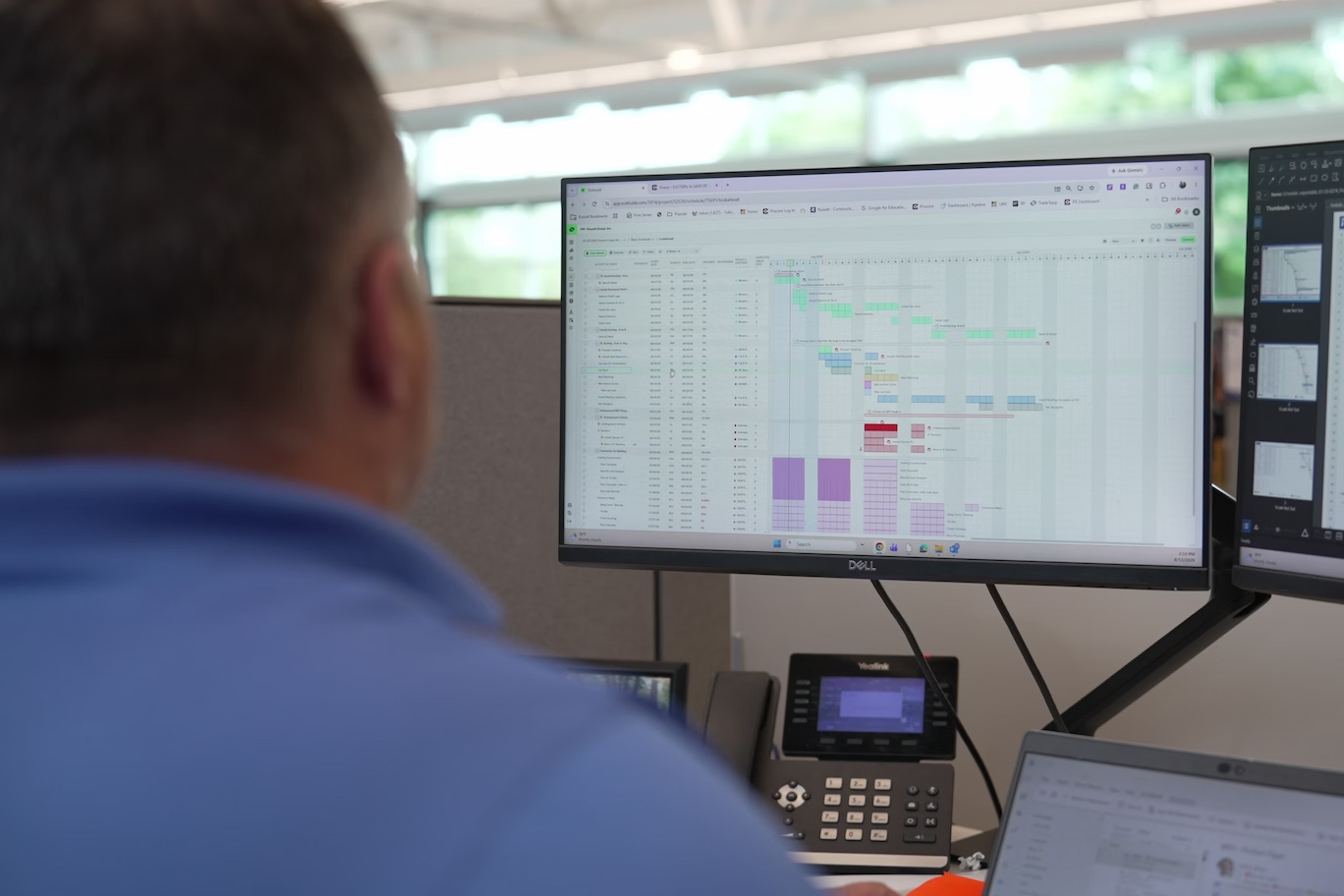


Outbuild is online scheduling software to work together on connected project schedules and look-aheads, enabling everyone to move faster.
Key Takeaways

- Schedules, Lookaheads, and Weekly Work Plans within one integrated platform.
- Real-time insights and project analytics through automated dashboards.
- Easier, streamlined plan management through a user-friendly interface.
Table of contents
- The core tradeoff of cloud scheduling vs. desktop
- So why is anyone still on desktop?
- Evaluating Desktop vs. Cloud Construction Scheduling Software Platforms
- What onboarding and training should look like
- The verdict: how to decide
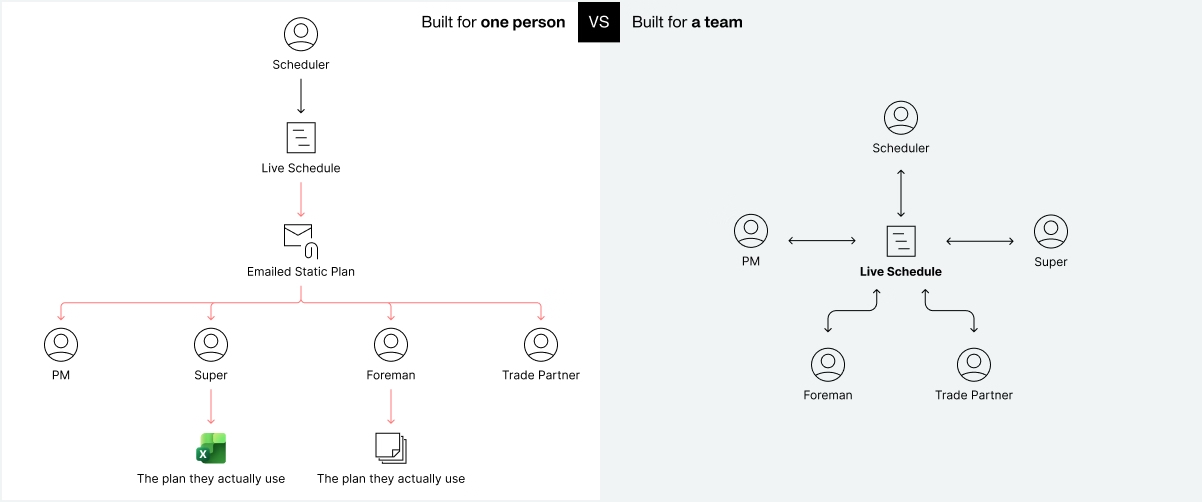
For years, desktop software has been the default for construction scheduling. The problem is that desktop platforms demand a scheduling rhythm that doesn’t align with real-world projects. The schedule lives on one machine, one person updates it, and everyone else waits for a printout. Anyone who has spent time in the field will tell you what happens next: crews find a way around it. They build their own lookahead in Excel or on a whiteboard, because the official schedule isn't usable where the work happens. That's how a master schedule becomes a fancy rearview mirror instead of a tool that helps the team get the job done.
Cloud construction scheduling platforms are built the other way around. Everyone works off one live plan, so the field and the office see the same schedule at the same time. Everyone can collaborate on the schedule, so the people doing the work in the field can inform the master schedule in the office.
Desktop and cloud CPM scheduling tools were built for two different jobs. Desktop tools were built so one expert could construct and defend a schedule. Cloud tools are built so an entire project team can execute one.
That difference used to come with a real tradeoff: the tightest record of what happened or the most usable plan. That tradeoff has closed. A cloud schedule with baselines, version history, documented delays, and schedule impacts is a more complete record than a file, not a weaker one, because it's built as the work happens instead of reconstructed afterward.
Desktop software has been the industry's main option for capable CPM scheduling for years, and four reasons for staying come up over and over:
- It works for the scheduler. A mature desktop tool is fast and precise in trained hands.
- The contract specifies the deliverable. Many owners require the schedule to be submitted as an XER.
- The expertise is sunk. Years of learned workflows, custom layouts, and hard-won fluency live in that tool, and in the person who owns it.
- Migration looks like risk. Hundreds of active projects, live baselines, and a team mid-job. "Not right now" feels rational when the current setup is working "just fine."
Notice what isn't on that list: a job desktop does better. The reasons for staying are primarily related to the friction of changing, not the capabilities of construction cloud platforms.
The truth is, newer technology offers so many benefits to construction teams and, ultimately, it won’t be a question of if to change, it’ll be when.
The move from desktop to cloud software platforms is more than a technology shift; it represents a fundamental change in how construction teams can plan and manage their schedules.
Traditional desktop scheduling platforms were built for a more rigid approach to scheduling that was ultimately unrealistic. They appeared to provide structure and control but didn’t accommodate the flexibility and constant change that real-world projects demand. As a result, teams worked outside of the software to get the job done, which created inconsistencies and gaps.
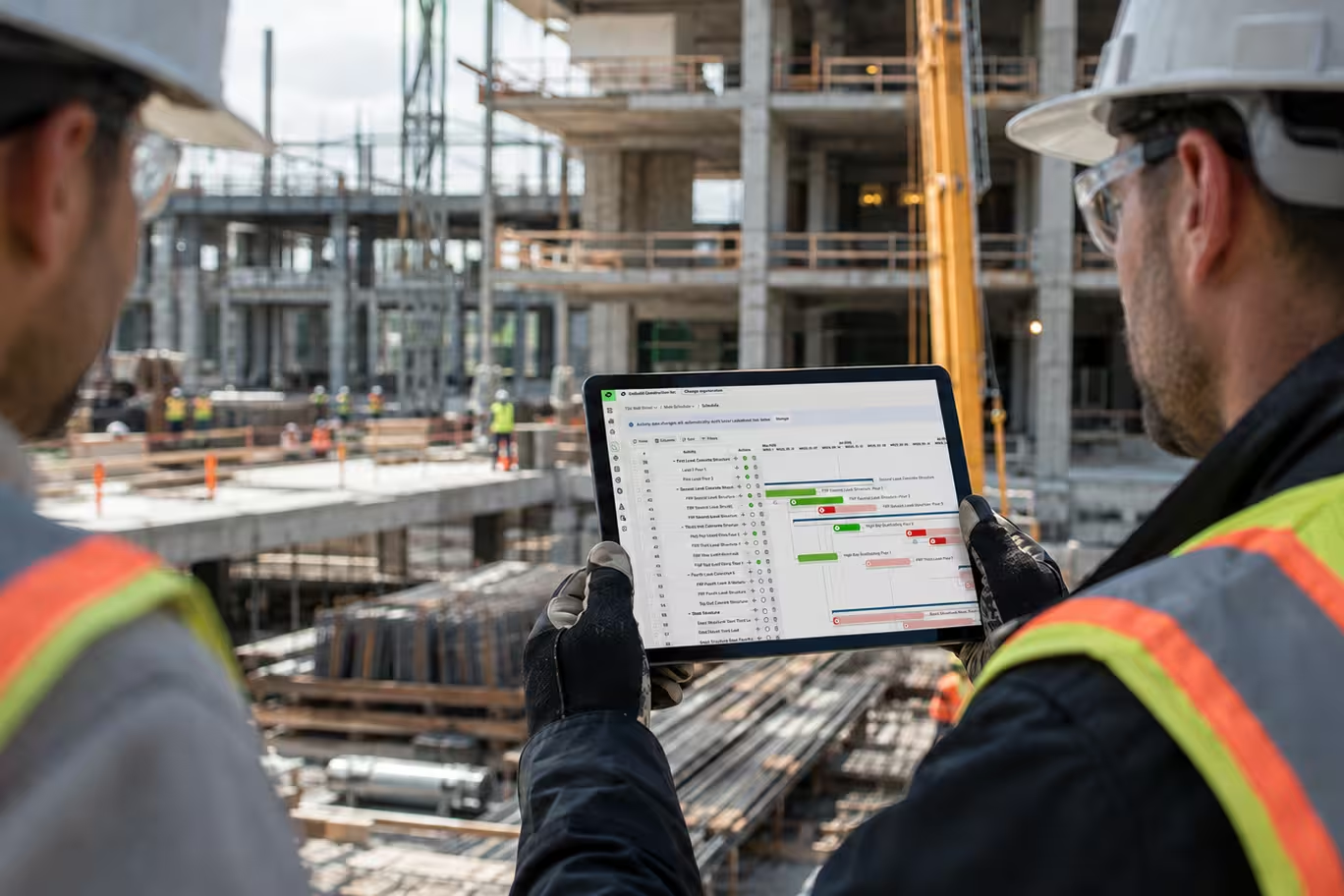
Construction cloud-based platforms make it possible for the field and office to share information and work from a single source of truth. Teams can collaborate around a shared, continuously updated plan, helping close the gaps that have caused delays and rework.
Here are four questions to ask as you build the case with your team.
1. How is the schedule built and maintained?
A desktop schedule is usually structured around whoever maintains it. Activities get organized so one scheduler can update them quickly, which is not the same as organizing them around how the building actually goes together. The field then has to translate the schedule into something usable before crews can work from it. Ultimately, if the plan isn't usable where the work happens, the field will build one that is, and it won't be connected to the master schedule.
The biggest issue created by all of this is that it takes an enormous amount of effort to keep a desktop schedule updated. That means your data isn’t fresh and the effectiveness of anything on top of it, like AI or other reporting systems, is drastically reduced.
Cloud CPM scheduling software like Outbuild, on the other hand, allow the people doing the work to inform the schedule, which keeps the schedule up-to-date and allows AI tools you connect to it to be far more accurate and effective.
2. Where does the real schedule live?
In a desktop tool, you work off copies. Six weeks into a job you can have the scheduler's working version, the version on the network share, the one emailed to the owner, and the one a PM saved locally. None of them agree, and figuring out which one is right requires waiting on the scheduler to answer an email or Teams message. Ultimately this erodes the team’s confidence in the schedule and reduces efficiency.
The usual defense of that model is that a saved, dated file is a fixed artifact you can point to in a dispute. But let’s be precise about what actually makes a schedule defensible. It's the completeness of the documentation: what the plan was, when it changed, who changed it, what the impact was, and what evidence backs it up.
A construction cloud software can produce that record more completely than a file can, with baselines, version history, an audit trail, and documented roadblocks and schedule impacts captured as work happens instead of reconstructed months later by someone reading old emails.
Going from Scheduler to Strategic Leader
An inside look at how construction scheduling is evolving
- Dive into the problem schedulers face with the status quo
- Learn about elevating the Scheduler Role
- Discover the rise—and limitations—of modern scheduling tools
- Understand how to evaluate scheduling software (with a handy checklist!)
3. Cost of Ownership
Desktop platforms usually charge a per-user license. Cloud platforms vary: some are also user-based, while others price on your annual construction volume.
Per-user pricing creates the same problem desktop does: you ration access to keep the cost down. The seats that get cut are the occasional users, superintendents, foremen, and trade partners, and those are the people whose input keeps the schedule accurate. You already pay millions of dollars for that knowledge on your job sites. Why not finally leverage it?
Volume-based pricing lets you give access to everyone who needs the schedule and everyone whose input makes it better.
4. Will it hold up for IT and for security?
There are two big assumptions that have been made about desktop-based scheduling software that simply aren’t true anymore. The first is that “local” means faster. The truth is that a browser-based schedule can open just as fast, if not faster, than most P6 files pulling from a server. Plus, in a platform like Outbuild, which leverages AI agents and a separate but connected lookahead, you further increase your speed because your scheduling and planning workflows are more efficient.
The second is that on-premises means safer. Ask any construction cloud vendor where data is hosted, what the backup and recovery commitments are, whether SSO and role-based permissions are supported, how view-only access works for owners and trade partners, and which security certifications are current and when they were last audited. Then apply the same scrutiny to what you run today. There are likely schedule files sitting on individual laptops and network shares, outside IT's control, with no record of who opened or copied what.
A platform nobody uses is an expensive line item, and if your team doesn’t get on board, you’re bound to be stuck with the same gap you experienced before. So when you’re evaluating platforms, make sure to consider the implementation plan as carefully as you evaluate the product, because that’s what really determines your ROI.
Here's what to expect, and what to ask for.
- A real pilot, before you commit. Nobody moves off their existing platform all at once with 200 active jobs mid-year. Start with a handful of live projects and teams who want to try something new, and let them evaluate it for themselves. Buy-in comes easier from peers than from a leadership directive, and a pilot will tell you things a demo can’t.
- Training built around roles. A superintendent, a PM, and a scheduler all need different things from the tool, and they need training in how to get the most out of the tool in their role.
- A self-serve path for everyone who comes later. Turnover, new hires, and new project teams will require training too. A certification path or course library is what will keep your team up to speed. Ongoing support and training can help make that process even smoother.
- Support that outlasts the launch. Ask what happens six months in, once the implementation is officially done. You want a named point of contact, a regular check-in cadence, and a support team that understands construction.
Obviously we are biased toward cloud CPM platforms, but it’s for good reason. Construction teams that can successfully connect the field and office will run more efficiently, with fewer delays. That helps everyone, and we firmly believe it’s the new standard in scheduling.
So instead of comparing features, ask these five questions:
- How many people need to act on our schedule, not just read it?
- How long is the schedule out of date between updates, and what has that gap cost us in the last year?
- Is our schedule primarily a defensible record or an operating plan? A schedule needs to be both to be effective.
- What does our contract actually require us to submit, and in what format?
- Who would have to champion this internally, and what are they afraid of losing?
All of these point in the same direction: a desktop schedule is only as good as the person maintaining it, and no matter how good they are, they become a bottleneck. Meanwhile, with a cloud platform you could be tapping into the knowledge of your entire team to better inform and run the schedule.
That's the problem Outbuild was built to solve: the master schedule, Lookahead Planning, and the Weekly Work Plan all live in one connected system. You have Roadblocks to track what's holding work up, Schedule Impact Requests (SIRs) to document delays and what caused them, and an Executive Dashboard so leadership can see portfolio health without opening each project.
When it comes to working with or replacing P6, existing P6 schedules import directly via XER, and you can export to any format you need. With versioning, data date features, TIA data, and session logs, Outbuild schedules provide more actionable data for the courtroom than any alternative. The result is a plan your field teams actually work from, projects that finish on time, and real, contextual, structured data you can use to tell the project’s story: an invaluable asset for defending the current schedule and planning the next one.
Going from Scheduler to Strategic Leader
3. Cost of Ownership
Desktop platforms usually charge a per-user license. Cloud platforms vary: some are also user-based, while others price on your annual construction volume.
Per-user pricing creates the same problem desktop does: you ration access to keep the cost down. The seats that get cut are the occasional users, superintendents, foremen, and trade partners, and those are the people whose input keeps the schedule accurate. You already pay millions of dollars for that knowledge on your job sites. Why not finally leverage it?
Volume-based pricing lets you give access to everyone who needs the schedule and everyone whose input makes it better.
4. Will it hold up for IT and for security?
There are two big assumptions that have been made about desktop-based scheduling software that simply aren’t true anymore. The first is that “local” means faster. The truth is that a browser-based schedule can open just as fast, if not faster, than most P6 files pulling from a server. Plus, in a platform like Outbuild, which leverages AI agents and a separate but connected lookahead, you further increase your speed because your scheduling and planning workflows are more efficient.
The second is that on-premises means safer. Ask any construction cloud vendor where data is hosted, what the backup and recovery commitments are, whether SSO and role-based permissions are supported, how view-only access works for owners and trade partners, and which security certifications are current and when they were last audited. Then apply the same scrutiny to what you run today. There are likely schedule files sitting on individual laptops and network shares, outside IT's control, with no record of who opened or copied what.
A platform nobody uses is an expensive line item, and if your team doesn’t get on board, you’re bound to be stuck with the same gap you experienced before. So when you’re evaluating platforms, make sure to consider the implementation plan as carefully as you evaluate the product, because that’s what really determines your ROI.
Here's what to expect, and what to ask for.
- A real pilot, before you commit. Nobody moves off their existing platform all at once with 200 active jobs mid-year. Start with a handful of live projects and teams who want to try something new, and let them evaluate it for themselves. Buy-in comes easier from peers than from a leadership directive, and a pilot will tell you things a demo can’t.
- Training built around roles. A superintendent, a PM, and a scheduler all need different things from the tool, and they need training in how to get the most out of the tool in their role.
- A self-serve path for everyone who comes later. Turnover, new hires, and new project teams will require training too. A certification path or course library is what will keep your team up to speed. Ongoing support and training can help make that process even smoother.
- Support that outlasts the launch. Ask what happens six months in, once the implementation is officially done. You want a named point of contact, a regular check-in cadence, and a support team that understands construction.
Obviously we are biased toward cloud CPM platforms, but it’s for good reason. Construction teams that can successfully connect the field and office will run more efficiently, with fewer delays. That helps everyone, and we firmly believe it’s the new standard in scheduling.
So instead of comparing features, ask these five questions:
- How many people need to act on our schedule, not just read it?
- How long is the schedule out of date between updates, and what has that gap cost us in the last year?
- Is our schedule primarily a defensible record or an operating plan? A schedule needs to be both to be effective.
- What does our contract actually require us to submit, and in what format?
- Who would have to champion this internally, and what are they afraid of losing?
All of these point in the same direction: a desktop schedule is only as good as the person maintaining it, and no matter how good they are, they become a bottleneck. Meanwhile, with a cloud platform you could be tapping into the knowledge of your entire team to better inform and run the schedule.
That's the problem Outbuild was built to solve: the master schedule, Lookahead Planning, and the Weekly Work Plan all live in one connected system. You have Roadblocks to track what's holding work up, Schedule Impact Requests (SIRs) to document delays and what caused them, and an Executive Dashboard so leadership can see portfolio health without opening each project.
When it comes to working with or replacing P6, existing P6 schedules import directly via XER, and you can export to any format you need. With versioning, data date features, TIA data, and session logs, Outbuild schedules provide more actionable data for the courtroom than any alternative. The result is a plan your field teams actually work from, projects that finish on time, and real, contextual, structured data you can use to tell the project’s story: an invaluable asset for defending the current schedule and planning the next one.
Frequently Asked Questions
For construction teams that need field and office input, cloud CPM scheduling software is often the better fit. Shared access helps teams report progress, keep the schedule current, and work from the same plan. Desktop tools can still suit specialist scheduling workflows and offline needs. Compare scheduling capabilities, contract requirements, and how easily your team can contribute updates.
Some can and some can't, so verify it rather than assume. XER is P6's native export format. Mature construction cloud platforms import it, but general-purpose project tools often don't. Ask for a test import using your own most complex schedule, not a demo file, and confirm the platform can also export back to XER if your owner contract requires P6 submissions. Outbuild imports P6 schedules directly via XER and exports to XER, XML or PDF, so teams can move without rebuilding schedules from scratch.
Cloud platforms can meet construction teams’ security requirements, but evaluate each vendor’s controls. Request a current SOC 2 Type 2 report and review its scope and reporting period. Confirm support for single sign-on, role-based permissions, and view-only access. Ask about backups, recovery, data retention, and access logging. Apply the same scrutiny to your current desktop setup, including how your team stores and shares schedule files.
Yes. What makes a schedule defensible is how complete its documentation is: the original plan, what changed, when, who changed it, what the impact was, and the evidence behind it. A cloud platform records that as the work happens through baselines, version history, audit trails and documented delays. A saved file often has to be pieced together from old emails months later. In Outbuild, Schedule Impact Requests (SIRs), data date features, TIA data and session logs add structured evidence to that record.
Desktop tools usually charge per user, so contractors limit how many seats they buy. The seats that get cut usually belong to superintendents, foremen and trade partners, the people whose input keeps the schedule accurate. Some cloud platforms also charge per user. Others, like Outbuild, price by annual construction volume and include unlimited users, so everyone who touches the schedule can get access at no extra cost.


Ready to see Outbuild?
Join hundreds of contractors from 10+ countries that are saving money by scheduling better


We’ll be in touch soon!