

Outbuild is online scheduling software to work together on connected project schedules and look-aheads, enabling everyone to move faster.
Key Takeaways

- Schedules, Lookaheads, and Weekly Work Plans within one integrated platform.
- Real-time insights and project analytics through automated dashboards.
- Easier, streamlined plan management through a user-friendly interface.
Table of contents
- Jobs to be done in scheduling a complex project
- What to prioritize when you evaluate scheduling software at enterprise scale
- The key players in enterprise scheduling software for construction
- Construction Scheduling Software Comparison for Enterprise Firms
- The only thing that really matters when choosing a construction scheduling platform for enterprise firms
- The final word on construction scheduling software for large projects
There's an assumption baked into most enterprise scheduling decisions. It’s that "more capable" means "more complex." A firm grows, takes on bigger and more numerous projects, and decides it's time to upgrade to something more powerful, which usually turns out to mean something harder to use.
Modeling a complex plan is the part scheduling software has done well for decades. Thousands of activities, a clean critical path, resource loading, none of that is where enterprise programs actually break down. They break down in the gap between the plan and the field: getting the schedule to the people doing the work, keeping it current as the job changes, and turning what comes back into decisions before a small slip turns into a big dollar sign.
That gap is how we should evaluate enterprise construction scheduling software, yet most firms don’t even consider it. This guide is built to change that. We'll break enterprise scheduling into the four jobs your system has to do, the five things that matter most when you evaluate it, and a quick look at where the major platforms, P6, Procore, Autodesk, Microsoft Project, and Outbuild, land against each one.
Enterprise scheduling gets talked about as one task, but it's really four distinct jobs. Building the plan is obvious, but the other three are all essential jobs that rest on the schedule: getting that plan to the field and back, turning what's happening on site into decisions, and protecting the project when things slip.
Here are the four jobs your scheduling system has to do, what each one really involves, and why it gets harder at scale.

Job #1: Build a plan hold the complexity of a large project
At scale, there’s a level of complexity required by the job. Your construction scheduling software needs to be able to handle thousands of activities and dependencies and handle multiple projects running simultaneously under one PM.
Job #2: Keep the plan connected to the field
You need a mechanism for communicating the plan to the field and vice versa. Generally this is done through emails and PDFs, and someone whose job it is to manually update the schedule. Newer software platforms like Outbuild connect the lookahead to the master schedule so all of this can be done in one platform.
Job #3: Use all that data to inform live, portfolio-level decisions
Executives and PMs need to read schedule health, track key milestones, and gauge risk exposure across a portfolio. This often lives in separate BI tools or is handled by outside consultants. At scale, consider how quickly you can get up-to-date information, because that will determine how proactive you can be in protecting your schedules.
Job #4: Protect projects from risk and delay
Delays happen in every construction project, so the job is to control the ones you can and account for the ones you can't. That means capturing each delay as it happens: when it happened, what caused it, how it rippled through the schedule.
That record does two jobs at once. Looking forward, it gives leadership the data to see where delays keep originating and fix the process behind them. Looking back, it builds a defensible schedule that protects the firm if a delay turns into a claim.
Next, let’s talk through the features that get these jobs done, and how to evaluate them in the software you’re considering.
The four jobs tell you what scheduling has to do. Evaluating software is about figuring out which tools can do all four, at your scale, with your teams. There are five things that matter most. Let’s dive in.
Field Adoption: You can buy the most capable platform on the market, but if the field won't touch it, you've bought a very expensive planning document. Adoption is what turns a schedule from a plan the office maintains into a tool the whole project runs on. Ask yourself:
- Will your people on site actually use it?
- Is it faster than the workaround they'll invent if it isn't?
- Do superintendents and foremen get something back for the data they put in, or is entry just a tax they pay for the office's benefit?
Depth and Capability: A complex project puts demands on the software itself: thousands of activities and dependencies, several projects running at once, specialized sequencing that doesn't fit a template, the list goes on. The question is whether the software can carry that weight without buckling, and whether a scheduler can actually work in it at that size.
- Does it have the depth your work demands?
- Does it stay usable when the plan gets big and messy, or does it slow to a crawl the moment it meets a real project?
Data integrity: Every schedule change is a decision someone may need to explain later. The thing to look for is whether that trail is captured automatically or depends on people remembering to log it.
- How does the software track changes and history?
- Is capturing that a natural part of the workflow, or a separate step that only happens when someone remembers?
Integrations: Scheduling doesn't live on an island. If you choose a dedicated scheduling tool, consider how it will need to connect to the rest of your tools. Here are some key questions:
- Does it integrate with the software your teams already rely on?
- Can critical data move between those systems automatically, so less of it falls through the cracks?
Scalability: The right question isn't whether a tool works today, it's what happens when you add more projects, bigger projects, and more people to the system. Here are the questions to ask:
- Does collaboration stay smooth as the user count climbs, or does it get unwieldy?
- How does pricing move as you grow: by user, by project, or ACV?
There are a handful of tools construction teams consider when it comes to scheduling, and each one fits a little differently. A lot of that comes down to where they started; some began as enterprise scheduling engines, others as all-in-one platforms, design tools, or general planners. Here's a quick look at the main players and where each one lands.
Outbuild
Every other tool on this list does one thing well: P6 models a deep, complex CPM plan, Procore runs documents and the field, Autodesk owns design and preconstruction, Project keeps planning simple and dependable. But scheduling that actually drives execution, where the plan and the field move together, pushes against the boundaries of what each of them was built to do. Outbuild believes this is the way forward for construction scheduling, and so connecting the field’s data to the schedule is at the center of what Outbuild does, and you feel it the moment you open your first project.
It’s web-based, so the schedule lives where the work happens instead of on one scheduler's desktop. It connects the master schedule to the field's lookahead, so the plan and the reality on the ground stay aligned. And because every plan includes unlimited users, everyone from the PM to the super to the trades can get in and use it, so the data comes back in real time, not after the job is already over.
“I've spent a lot of time in P6 and Project. It's refreshing to work within a schedule that isolates the necessities and improves the functionality essential for the field.” Jeff Heiland | Superintendent, Talley Riggins Construction Group
Oracle Primavera P6
Primavera has a long reputation as CPM scheduling software for construction, and P6 remains the reference point for large capital programs. Many construction managers come out of school already trained or certified in it, which keeps companies entrenched in it. It is genuinely powerful at Job #1: modeling a deep, complex CPM plan with a clear critical path and logic ties across thousands of activities.
Where it struggles is execution. P6 is a system of record, not a system of execution. It holds the plan well but does little to help teams act on it in the field. In our experience with enterprise teams, that gap is why so much of the real work ends up managed in Excel, sticky notes, and whiteboards. Powerful, yes, but a steep learning curve and limited agility.
Procore Scheduling
Procore is building towards an all-in-one platform, and it is strong at what it started with: document and field management. If that is your priority, it’s a solid choice.
Scheduling, though, isn't its center of gravity. Across budgets, commitments, schedule, and daily reports, many teams tell us they hit gaps and supplement Procore with more focused tools. On scheduling specifically, the GCs we talk to describe it as a lightweight option that doesn't reach the robustness a complex enterprise program demands.
Autodesk Construction Cloud
Autodesk began in design and drafting (Revit and AutoCAD) and moved into construction later, a similar arc to Procore. Its strength is in preconstruction and design, and it is more than capable there. Scheduling, however, isn't what the platform was built to do, and on a complex build it isn't where the schedule is meant to live and drive execution.
Microsoft Project
Microsoft Project began as a general-purpose planner, and it has long been a standard in small and mid-sized construction firms. It is easier to learn than P6, offers a clean, usable Gantt, and is dependable. But it is a generic tool adapted for construction. To get actionable construction reporting it has to be stitched together with other systems.
Two things matter here for enterprise teams. First, Project Online, the cloud version, retires September 30, 2026, leaving the desktop and on-prem Server options as the team’s only choice. Second, because those options live on a desktop or server, the plan can't be reached at the wall where the work actually happens. That last limitation is one the industry has largely accepted as normal, for now.
Scheduling software is a funny thing. Companies tend to switch platforms because they hit a certain ACV and feel like they need to up their scheduling game. So, they end up “upgrading” to a software that is much more complex and seemingly more capable than what they are using. Unfortunately, this complexity also tends to create more delays and issues and firms are left with a system for scheduling that is harder to use and causes more problems.
When it comes to it, remember that the best enterprise construction scheduling software is the one that your team will actually use. It’s the only value add that really matters in terms of software. Every other person, process, or tool is just “necessary non value”, which can easily and quickly turn to waste. The more waste you have, the less profitable you are.
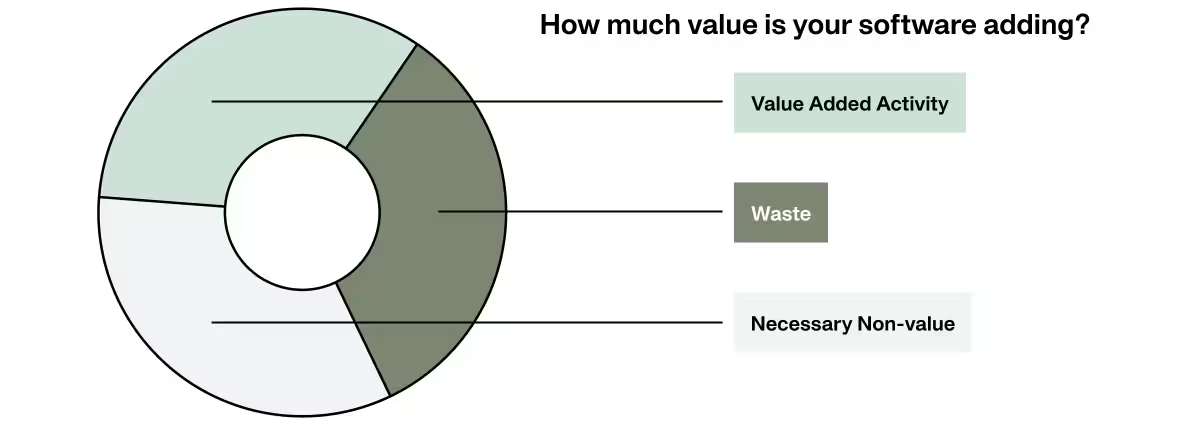
In terms of your tech stack, the more people that use the tools you have, and can add value to their work using them, the less waste you have. Additionally, the fewer extra people and tools you need to make the software valuable is a reduction in items of incidental value.
The goal is to make the value-add piece of the pie as big as possible and eliminate as much waste as possible. So, when it comes to scheduling, how do we do that? Two things:
1. Implement software that makes everyone's jobs easier and more efficient. Ultimately, if the software is hard to use, fewer people are willing to use it and even fewer people can use it. Because construction is a highly specialized industry, it's important to keep an eye on generic software here, because these often require workflows that aren't as intuitive as tools made for construction.
2. Partner with companies that are invested in their implementation. Part of solving the issue of adoption within your firm is partnering with a company that has a solid onboarding, training, and support process. Consider how easy it will be to train your team on using the software and who on your team will have access to support when issues come up. Sometimes this is done in-house, and sometimes through a third party.
“I was skeptical at first; we didn't think we needed a new scheduling solution. Outbuild proved to add so much functionality without adding premium cost that the decision was easy to test the waters. Once we started using it, we haven't looked back. On top of that, the team at Outbuild was extremely easy to work with while we launched and learned how to use our new tool.” Neil Ascione | President, RC Andersen
How to Fix the Disconnect Between the Office and Field.
Download the report to learn more:
- Learn about the why scheduling and planning fail the field
- Understand the pain points, inefficiencies, and evolving practices shaping scheduling today
- Find out how to bridge critical disconnects happening in construction
What makes scheduling software "enterprise-grade" doesn't come down to activity counts, CPM logic, or resource loading. All of these things measure the plan, and a plan that never makes it to the field is a very expensive tool gathering dust in the shop.
An enterprise construction scheduling platform should connect to the field, to the people doing the work, and to what's actually happening on site as it changes. “Enterprise-grade” means the plan doesn't just get built, it gets used. And it gets used by everyone from the scheduler to the super to the trades. It stays updated in real time instead of functioning as a fancy rear-view mirror.
For enterprise construction, that's the difference that matters: not how sophisticated the plan looks on day one, but whether it's still driving the work on day two hundred.
Want to see how Outbuild is changing the game for construction scheduling? Get a demo.
How to Fix the Disconnect Between the Office and Field.
What makes scheduling software "enterprise-grade" doesn't come down to activity counts, CPM logic, or resource loading. All of these things measure the plan, and a plan that never makes it to the field is a very expensive tool gathering dust in the shop.
An enterprise construction scheduling platform should connect to the field, to the people doing the work, and to what's actually happening on site as it changes. “Enterprise-grade” means the plan doesn't just get built, it gets used. And it gets used by everyone from the scheduler to the super to the trades. It stays updated in real time instead of functioning as a fancy rear-view mirror.
For enterprise construction, that's the difference that matters: not how sophisticated the plan looks on day one, but whether it's still driving the work on day two hundred.
Want to see how Outbuild is changing the game for construction scheduling? Get a demo.
Frequently Asked Questions
It isn't activity counts, CPM logic, or resource loading — those just measure the plan itself. Enterprise-grade scheduling software is defined by whether the plan actually connects to the field: to the people doing the work and to what's happening on site as it changes in real time. A sophisticated schedule that never reaches the crew is, as the guide puts it, "a very expensive tool gathering dust in the shop."
Build a plan that can hold the complexity of a large project (thousands of activities and dependencies, multiple projects under one PM). 2) Keep that plan connected to the field, so the master schedule and the field lookahead stay in sync instead of living in separate emails and PDFs. 3) Turn field data into live, portfolio-level decisions for executives and PMs. 4) Protect projects from risk and delay by capturing what happened, when, and why — both to fix recurring causes and to build a defensible record if a delay becomes a claim.
Five things matter most: field adoption (will the field actually use it, and is it faster than their workaround?), depth and capability (can it handle a large, complex plan without slowing down?), data integrity (is change history captured automatically or dependent on someone remembering?), integrations (does it connect to the rest of your tech stack?), and scalability (does collaboration and pricing hold up as you add more projects, people, and complexity?).
Each platform tends to be strongest at the job it was originally built for: P6 for deep CPM modeling on large capital programs, Procore for documents and field management, Autodesk for design and preconstruction, and MS Project for simple, dependable Gantt-based planning. Outbuild was built specifically to close the plan-to-field gap — it's web-based, connects the master schedule to the field lookahead natively, and includes unlimited users on every plan, so PMs, superintendents, and trades all work from the same live schedule instead of updates flowing through email and PDFs.
It depends on how you're using it. MS Project offers a clean, dependable Gantt and is a long-standing standard for small and mid-sized firms, but as a generic planning tool it needs to be stitched together with other systems for real construction reporting, and it's desktop-bound, so the plan can't be reached where the work happens. It's also worth noting that Project Online (the cloud version) retires September 30, 2026, leaving only the desktop and on-premise Server options — which narrows its fit for enterprise teams that need field access even further.



Ready to see Outbuild?
Join hundreds of contractors from 10+ countries that are saving money by scheduling better


We’ll be in touch soon!